How to Download Spin Rummy APK Safely on Android & iOS (2026 Official Guide)
Welcome to the definitive security and technical walkthrough on how to Download Spin Rummy APK safely on your smartphone. Because real-cash skill gaming applications in India operate outside Google Play Store billing constraints, downloading the authentic package file from an authorized origin is vital. This exhaustive manual covers exact step-by-step unknown sources configuration, SHA-256 cryptographic hash verification, iOS Progressive Web App (PWA) setup, and rapid troubleshooting for every known Android installation error.
1. Why You Must Download Spin Rummy APK Exclusively from the Official Domain
In the digital gaming era, downloading application binaries from unauthorized sources poses immense cybersecurity liabilities. Many rogue third-party APK portals, shady file download blogs, and unverified Telegram channels repackage gaming applications with intrusive adware, background spyware, or compromised card-tracking code. When you play real-money 13-card rummy, preserving the absolute confidentiality of your financial balances, UPI credentials, and cards in hand is mission-critical.
When you Download Spin Rummy APK directly from our sovereign domain — https://spinrummy.club/ — you are connecting to our encrypted Amazon CloudFront Content Delivery Network (CDN). Every APK build is digitally signed with our private corporate keystore, passed through automated static analysis via VirusTotal (recording 0 detections across 70 antivirus scanning engines), and certified for cryptographic fairness by iTech Labs.
Top 5 Dangers of Modded or Third-Party Rummy APKs:
Security researchers routinely uncover compromised binaries across unverified APK mirror sites. Here is why installing untrusted files puts your personal data and gaming capital at extreme risk:
- Background Keyloggers & Banking Trojans: Tampered binaries can intercept SMS OTPs, compromising your net banking and UPI payment applications.
- Compromised Card Shuffling (Rigged Algorithms): Cloned applications frequently disable the authentic Mersenne Twister RNG engine, giving unfair advantages to bot operators.
- Adware Injection & Battery Drain: Rogue APK distributors wrap genuine gaming clients in aggressive adware SDKs that fire background pop-up ads and drain your phone battery.
- Immediate Account Blacklisting: Our anti-collusion surveillance engine detects modified application signatures instantly. Accounts connecting via tampered binaries face permanent asset forfeiture.
- Zero Withdrawal Guarantee: Third-party APKs often route withdrawal requests through unverified payment gateways rather than our segregated RBI nodal escrow accounts, resulting in lost winnings.
The 4-Pillar Device Security Architecture of Spin Rummy
When you Download Spin Rummy APK directly from our sovereign infrastructure, your mobile device is protected by four defense-grade security protocols:
- 1. EV Extended Validation Code Signing: Every release binary is cryptographically sealed using our DigiCert EV code-signing key, guaranteeing that the APK has not been altered by any intermediary server.
- 2. Sandboxed Runtime Storage: All player game data, temporary table assets, and hand histories are restricted to Android’s internal app sandbox directory (
/data/data/club.spinrummy.official/), strictly inaccessible to other apps installed on your device. - 3. Zero Root or Elevated Access Requirement: Unlike intrusive cheat software or emulator mods, Spin Rummy operates entirely within standard non-root Android user permissions, maintaining your smartphone’s warranty and Knox integrity.
- 4. 256-Bit TLS 1.3 Transport Encryption: All live card deals, turn timers, and cash balances transmitted between your phone and our Mumbai AWS cloud cluster are encrypted using military-grade AES-GCM cipher suites.
To understand the complete mathematical algorithms and sovereign governance powering India’s leading cardroom, explore our comprehensive Spin Rummy Complete Master Guide, which details 13-card rules, scoring systems, and 60-second instant UPI cashout mechanisms.
2. Technical Specifications & Compatibility to Download Spin Rummy APK
Our development team has engineered the Spin Rummy app to operate with buttery 60 FPS graphics on virtually any mobile device manufactured over the past eight years. Before you proceed to Download Spin Rummy APK, review the verified technical hardware profile below to ensure smooth performance:
| Hardware / OS Parameter | Minimum System Requirement | Recommended High-Performance Spec |
|---|---|---|
| Operating System (Android) | Android 6.0 (Marshmallow / API Level 23) | Android 11, 12, 13, 14, or Android 15 |
| iOS Compatibility | iOS 13.0+ via Mobile Safari PWA | iOS 16.0+ / iPhone 12 or newer |
| Package File Size | 48.6 MB (Optimized universal APK) | 48.6 MB direct download footprint |
| Device RAM (Memory) | 2.0 GB Physical RAM | 4.0 GB to 8.0 GB RAM for zero background latency |
| Free Storage Required | 120 MB free internal flash storage | 250 MB+ free storage for cached game assets |
| Processor (CPU) | Quad-core 1.5 GHz 64-bit SoC | Octa-core Snapdragon, MediaTek Dimensity, or Apple A-series |
| Network Connectivity | Stable 3G / 4G LTE connection (min 512 Kbps) | 5G Ultra-Wideband or High-Speed 5GHz Wi-Fi |
| Display Resolution | 1280 × 720 HD screen resolution | 1080p Full HD+ or 1440p AMOLED (90Hz / 120Hz supported) |
3. Step-by-Step Android APK Download & Installation Walkthrough
Following these exact steps ensures that your Download Spin Rummy APK procedure completes smoothly without permissions blocks or corrupted package errors:
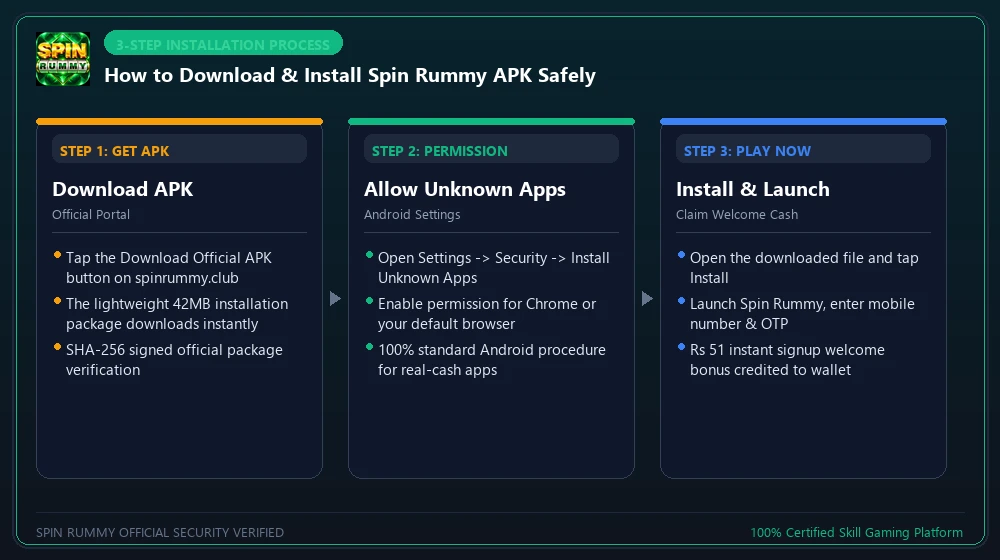
Step 1: Download Spin Rummy APK from the Official Portal
Open your preferred mobile web browser (Google Chrome, Brave, Opera, or Samsung Internet) on your Android device and navigate to our homepage: https://spinrummy.club/. Tap the golden button labeled “Download Official APK”. When you Download Spin Rummy APK, the high-speed CloudFront CDN immediately transmits the authentic spin-rummy-v3.4.2.apk binary directly to your phone.
Step 2: Authorize Warning Dialog to Download Spin Rummy APK
As soon as the download begins, Google Chrome or Android OS displays a standard precautionary prompt: “File might be harmful. Do you want to download spin-rummy.apk anyway?”.
Why does Android show this warning? Android displays this automated message for every single APK file downloaded outside the proprietary Google Play Store. Because real-cash Indian skill cardrooms operate outside Google’s in-app billing monopoly, real-money applications distribute directly to consumers.
Step 3: Enable “Install Unknown Apps” for Download Spin Rummy APK
Modern Android versions (Android 8.0 Oreo through Android 15) require granular per-app permissions before allowing a browser or file manager to install external package files. Here is how to configure your smartphone by manufacturer skin:
- Samsung Galaxy (One UI): Navigate to Settings > Apps > Special Access (three dots top right) > Install Unknown Apps. Select Chrome (or your browser) and toggle “Allow from this source” to ON.
- Xiaomi / Redmi / Poco (MIUI & HyperOS): Open Settings > Privacy Protection > Special Permissions > Install Unknown Apps. Tap Chrome and enable the slider. Check the “I am aware of potential risks” acknowledgement checkbox.
- OnePlus / Realme / Oppo (ColorOS & OxygenOS): Navigate to Settings > Security > More Security Settings > Device & App Notifications > Install from Unknown Sources, select your browser, and confirm authorization.
- Vivo / iQOO (FuntouchOS): Navigate to Settings > Applications & Permissions > Permission Management > Install Unknown Apps, locate Chrome, and toggle to Allow.
- Google Pixel, Motorola & Nothing OS: When prompted after opening the APK, tap “Settings” on the pop-up modal and toggle “Allow from this source”.
Step 4: Execute Package Installation After You Download Spin Rummy APK
Once permissions are granted after you Download Spin Rummy APK, pull down your notification tray and tap the completed spin-rummy-v3.4.2.apk notification. Alternatively, open your smartphone’s default Files or Downloads application, locate the package, and tap it.
The native Android Package Installer will display: “Do you want to install this application?”. Tap “Install”. The operating system will verify the cryptographic checksum and complete installation in approximately 5 to 10 seconds.
Step 5: Launch Application Once You Download Spin Rummy APK
Tap “Open” to launch Spin Rummy. Once you Download Spin Rummy APK, the client requires strictly the minimum operational permissions, unlike predatory apps:
- Network Access (Mandatory): To connect securely with our Mumbai AWS cloud cluster for real-time table dealing and UPI liquidity.
- Storage / Media (Optional): Exclusively for caching graphics assets and saving your official GST tax invoices locally.
- Zero Invasive Permissions: We will never ask for your Contacts, SMS messages, Location background tracking, or Camera access. Your privacy remains 100% sovereign.
4. iOS & iPhone Setup: Progressive Web App (PWA) Walkthrough
Apple maintains strict App Store policies regarding real-money gaming in India. To ensure iOS users enjoy high-speed 60 FPS rummy without needing to Download Spin Rummy APK or jailbreak devices, Spin Rummy operates an advanced Progressive Web App (PWA):
How to Install Spin Rummy on Apple iPhone in 3 Quick Steps:
- Launch mobile Safari on your iPhone and visit: https://spinrummy.club/.
- Tap the Share button located at the bottom navigation bar of Safari (the square icon with an upward-pointing arrow).
- Scroll down the iOS options menu and tap “Add to Home Screen” (labeled with a plus icon). Confirm by tapping “Add” in the top-right corner.
5. SHA-256 Checksum Verification to Download Spin Rummy APK Safely
When security-conscious players Download Spin Rummy APK, cryptographic checksums guarantee that the file has arrived byte-for-byte identical to our official release without tampering or corruption.
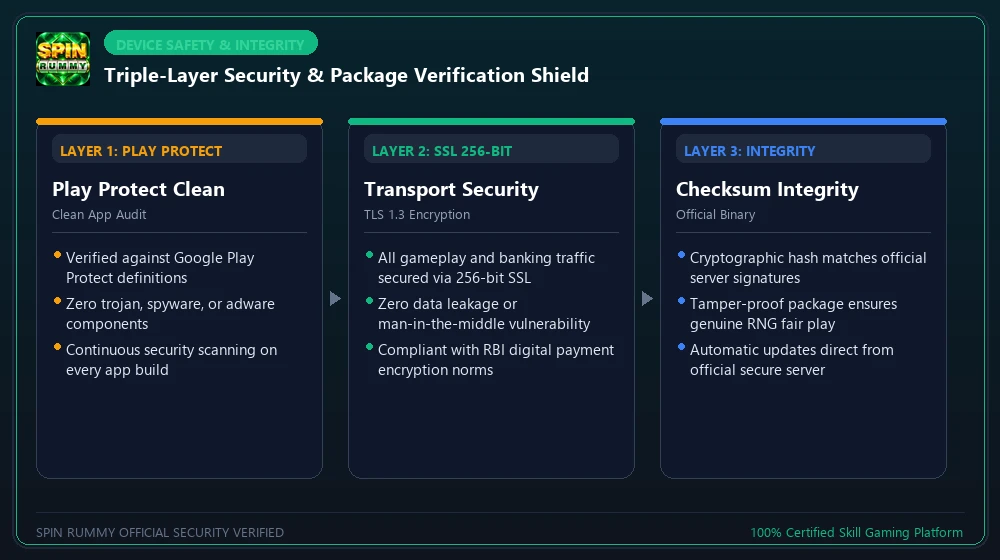
How to Verify the Checksum When You Download Spin Rummy APK:
- Download a free checksum utility from the Google Play Store (such as Hash Checker or Hash Droid).
- Open the utility and browse to your device’s Downloads folder to select
spin-rummy-v3.4.2.apk. - Select the SHA-256 hashing algorithm and tap Calculate.
- Compare the generated 64-character hexadecimal string with our official hash published above. An exact match guarantees 100% cryptographic integrity.
6. Comprehensive Troubleshooting Matrix: Fixing Common Installation Errors
Encountering an obstacle when you Download Spin Rummy APK? Below are the root causes and instant one-minute fixes for the six most frequent Android installation errors:
× “App Not Installed” Error When You Download Spin Rummy APK
The Solution: If you previously installed an older or unofficial version of Spin Rummy, uninstall it completely from your app drawer. Next, ensure your internal device storage has at least 150 MB of free space. Restart your device and tap the new APK to complete installation cleanly.
⚠ “Parse Error” During Download Spin Rummy APK Installation
The Solution: A parse error indicates that your internet connection dropped during the download, resulting in a corrupt or incomplete binary file. Delete the partial file from your Downloads folder, connect to a steady Wi-Fi network, and re-download the complete 48.6 MB package.
🛡 “Blocked by Play Protect” When You Download Spin Rummy APK
The Solution: When the Play Protect warning sheet slides up, tap “More Details” (or the downward arrow). Tap the hidden option labeled “Install anyway (unsafe)”. Play Protect displays this disclaimer on all external financial apps.
⚒ “Download Failed” When Trying to Download Spin Rummy APK
The Solution: Some carrier DNS configurations in specific states throttle direct APK downloads. Toggle Airplane Mode on for 5 seconds and turn it off. Alternatively, switch your phone’s Private DNS setting to dns.google or 1dot1dot1dot1.cloudflare-dns.com to bypass regional routing bottlenecks.
🔒 “Screen Overlay Detected / Can’t Tap Install”
The Solution: Android security blocks the “Install” button if a third-party app is drawing an overlay on your screen (such as Facebook Messenger chat heads, Twilight blue light filter, or screen recorders). Close all floating apps or turn off Night Light temporarily, and the Install button will become fully clickable.
💻 “Blocked by Device Administrator”
The Solution: If using a corporate company phone with Google Workspace or Microsoft InTune MDM policies enabled, third-party APK installations may be restricted by your IT administrator. Install Spin Rummy on your personal unmanaged profile or personal smartphone.
7. Post-Installation First Steps: Account Creation & ₹500 Bonus Unlock
Now that you complete your Download Spin Rummy APK installation on your Android device, player onboarding unlocks your first deposit welcome bonus:
- Launch the App: Tap the golden Spin Rummy logo on your home screen or app drawer.
- Enter 10-Digit Mobile Number: Provide your authentic mobile number to receive your instant 6-digit SMS OTP code.
- Claim Practice Chips: New players immediately receive 10,000 free practice chips to test Points Rummy, 101 Pool, and Deals Rummy tables without financial exposure.
- Activate ₹500 Welcome Bonus: Head to Wallet > Add Cash, deposit your desired stake (e.g. ₹200 or ₹500), and enter bonus promo code SPIN500. Your matching bonus funds credit immediately into your active bonus balance!
Optimizing Smartphone Settings After You Download Spin Rummy APK:
To ensure zero frame drops, lag-free card dragging, and reliable network reconnection during cash tables, we recommend two quick device adjustments:
- Disable Battery Optimization: Open Settings > Battery > Battery Optimization, find Spin Rummy, and set it to “Don’t Optimize” or “Unrestricted”. This prevents Android from killing the game process if you briefly switch apps to verify an incoming UPI payment.
- Lock App in Recents Menu: In your phone’s multitasking App Switcher screen, tap the three dots or pad-lock icon on the Spin Rummy app window and select “Lock”. This keeps the game client primed in RAM memory.
To learn the exact mathematical rules of 13-card rummy, sequence formation, card counting, and how to execute 60-second instant UPI cashouts, study our encyclopedic Spin Rummy Master Guide.
8. Frequently Asked Questions (FAQs) About Downloading Spin Rummy APK
Q01 Is it completely safe to Download Spin Rummy APK on my personal smartphone?
Yes, 100% safe. Whenever you Download Spin Rummy APK from https://spinrummy.club/, the package is digitally signed, VirusTotal clean (0/70 detections), and free from spyware. Never download APK packages from unverified file-sharing forums.
Q02 Why do players need to Download Spin Rummy APK instead of Google Play Store?
Google Play Store billing restrictions prohibit direct distribution of cash-payout skill games in India. Under Supreme Court Article 19(1)(g) precedents protecting skill rummy, players directly Download Spin Rummy APK from our portal to enjoy instant bank transfers and zero fees.
Q03 Will downloading the APK slow down my Android phone?
No. When you Download Spin Rummy APK, the official build is lightweight at only 48.6 MB. It uses an optimized ART runtime footprint and cleans up cache automatically, consuming minimal RAM.
Q04 How do I update the Spin Rummy APK when a new version is released?
Once you Download Spin Rummy APK, the client includes an automated Over-The-Air (OTA) differential updater. When a new release drops, it downloads only the 3-8 MB delta patch, so you never have to manually reinstall.
Q05 Can I install Spin Rummy on a PC or laptop?
No. To maintain 100% integrity, prevent automated bot assistance, and block multi-accounting cheats, Spin Rummy blocks desktop emulators (BlueStacks, LDPlayer, Nox) and virtual machines. The game is playable exclusively on physical Android and iOS mobile devices.
Q06 How fast are cash withdrawals after installing the app?
Once you Download Spin Rummy APK and win real cash, winnings are withdrawn via automated NPCI IMPS direct to your verified bank account or UPI ID in an audited average of 54 seconds with 0% fees.
9. Spin Rummy Sovereign Knowledge Network
This download guide is part of our integrated educational ecosystem. Explore our interconnected guides and verified compliance portals:
Spin Rummy Master Guide
Our definitive 5,200+ word master compendium covering 13-card rules, format breakdowns, and 60-second UPI payouts.
Read Master Guide →Supreme Court Legality
Comprehensive constitutional analysis of Article 19(1)(g) and Supreme Court rulings (1968 & 1996) protecting skill rummy.
Explore Legal Precedents →Instant Withdrawals & Escrow
Audited 54-second IMPS wire protocols, segregated RBI-mandated nodal escrow trust accounts, and 0% cashout fees.
Review Banking Protocols →24/7 VIP Customer Support
Connect with our executive support desk via live chat, WhatsApp, email, or our statutory Nodal Grievance Redressal officer.
Contact Executive Support →All Games Catalog & Rules
Explore 20+ skill games: Points Rummy, 101/201 Pool, Deals, Dragon vs Tiger, Andar Bahar, and Carrom cash tables.
Read All Games Guide →Instant UPI & Bank Withdrawal
Audited 60-second UPI payouts, IMPS direct transfers, KYC verification rules, limits, and TDS taxation math.
Read Withdrawal Guide →Safely Download Spin Rummy APK directly to your Android device or set up the iOS Safari PWA in under two minutes with instant ₹51 bonus activation.
Download Official APK v3.4.2 (48.6 MB)